SolusVM is a popular control panel for managing VPS hosting. In SolusVM, the management node controls virtual server nodes and manages VPS instances. Follow this tutorial to install SolusVM.
What are the requirements?
- Fresh AlmaLinux, Debian, or Ubuntu installed on your VPS/Server.
How to install SolusVM?
Step 1: Log in to SSH as a root account.
For AlmaLinux or CentOS Stream, run the following command:
curl https://installer.dev.solusvm.com/latest -o installer && chmod +x ./installer && ./installerFor Ubuntu/Debian, execute the following one instead:
curl https://installer.dev.solusvm.com/latest -o installer && chmod +x ./installer && sudo ./installer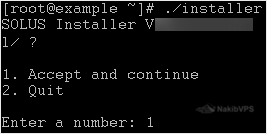
Step 2: Type "1" (without the quotes) and press Enter.

Step 3: Enter your email address.

Step 4: Enter your hostname or server IP Address. If you press enter without typing anything then it will use your default IP Address.
Installation may take from 5 to 10 minutes.
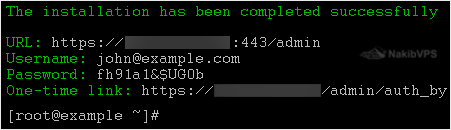
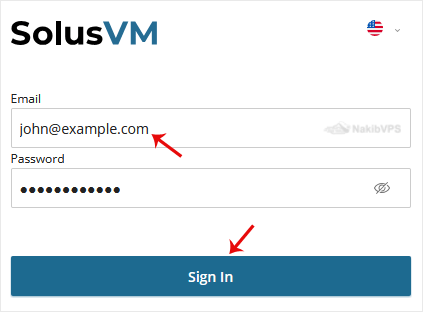
Step 5: SolusVM will display your login details.Copy Admin URL.
Step 6: Open the Admin URL in your browser and enter your credentials.
Note: Don't forget to change your default username and password for SolusVM. The default username/password is not secure, and it is easy for anyone to access your panel using them.